Steps
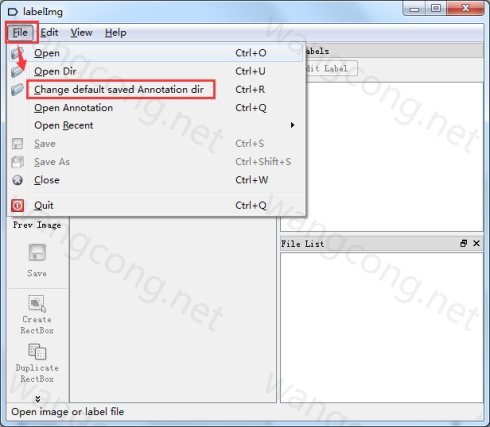
- 首先新建一个存放标定结果xml的目标文件夹(命名不要有中文)。
点击 file,选择 Change default saved annotation folder,选择存放xml文件的目标文件夹。
![]()
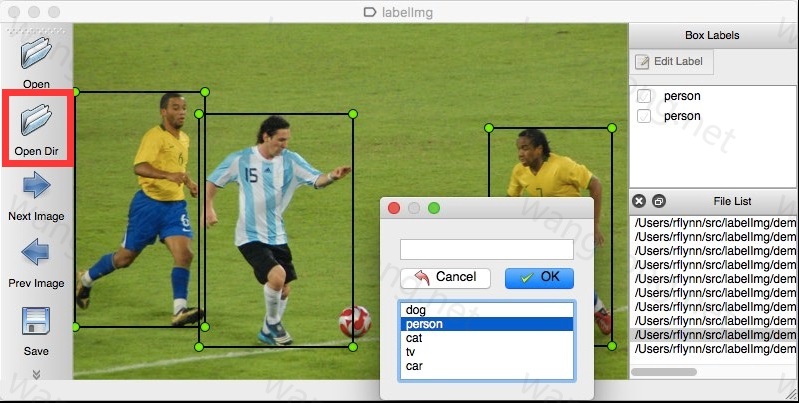
点击 Open Dir,打开图像数据目录(不要有中文)
![]()
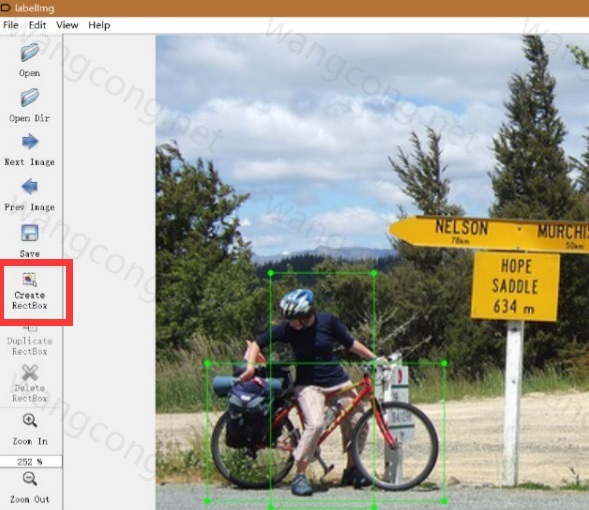
点击 Create RectBox,光标置于目标左上角,按住左键向右下角拖动。方框绘制完成后,双击选择弹窗中相应的类别名称。
![]()
标注完成后,光标放至方框内,该方框可移动位置以及右键删除.
标注完成后,点击左边栏的 save进行保存(务必保存)
Hotkeys
| Ctrl + u | Load all of the images from a directory |
|---|---|
| Ctrl + r | Change the default annotation target dir |
| Ctrl + s | Save |
| Ctrl + d | Copy the current label and rect box |
| Space | Flag the current image as verified |
| w | Create a rect box |
| d | Next image |
| a | Previous image |
| del | Delete the selected rect box |
| Ctrl++ | Zoom in |
| Ctrl— | Zoom out |
| ↑→↓← | Keyboard arrows to move selected rect box |